> For the complete documentation index, see [llms.txt](https://docs.miltechsimulations.com/llms.txt). Markdown versions of documentation pages are available by appending `.md` to page URLs; this page is available as [Markdown](https://docs.miltechsimulations.com/miltech-simulations-mv-22b-tiltrotor/aircraft-and-systems/aircraft-systems/center-control-display-unit-cdu/cdu-menu-1.md).
# CDU - Menu 1
Accessible through a single click of the CDU Button
Menu 1 (CDU)
*Functions not described are INOP*
1. **ACFT INIT:** Opens the Aircraft Initialization menu.
### ACFT INIT Submenu
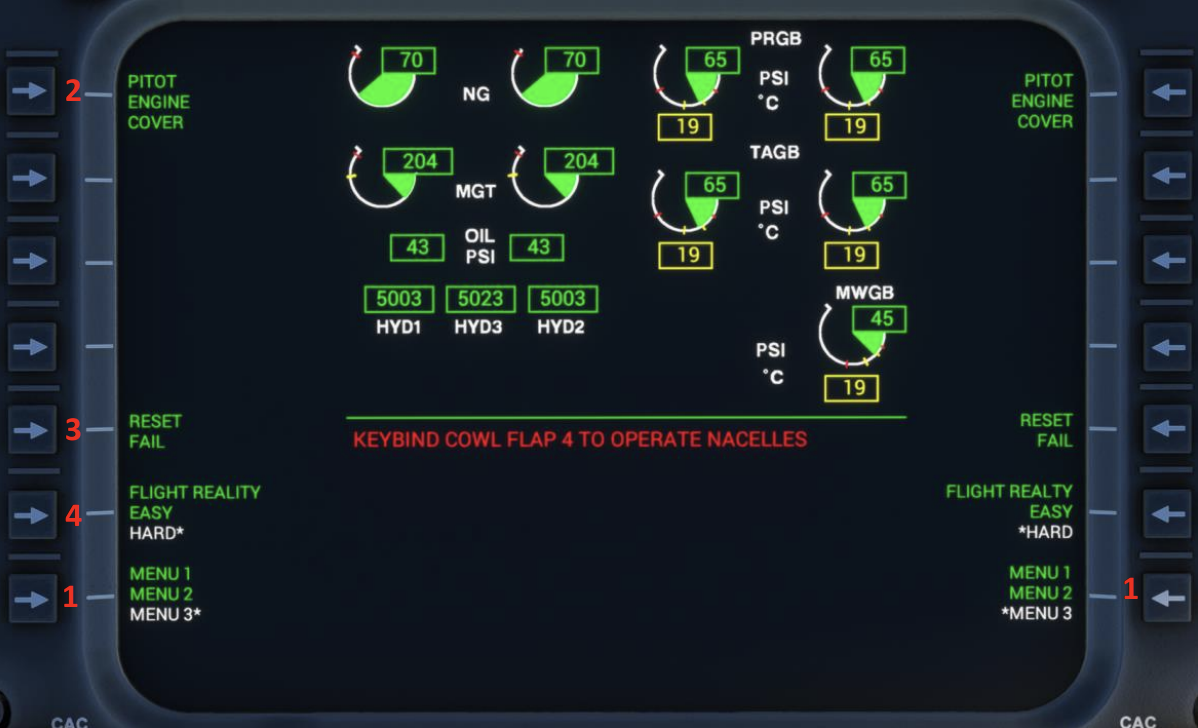
Figure: ACFT INIT Submenu (CDU) Menu 3
1. **Menu 1 / Menu 2 / Menu 3:** Switch between ACFT INIT Menu Screens. All items on Menu 1 and Menu 2 are INOP. All items listed here and shown are Menu 3.
2. **Pitot & Engine Covers:** Toggles pitot and engine covers on/off. Engines must be off for pitot and engine covers to appear on the external model
{% hint style="info" %}
Wheel chocks are automatically activated when the aircraft’s ground speed is Zero and parking brake is ON.
{% endhint %}
3. **Handheld GPS (Not Pictured):** Enables Aera-style GPS for flight planning and NAV.
4. **Reset Fail:** Only becomes available if the aircraft has crashed into the ground or engines have overstressed (RESET FAIL shows active in white with \*). To reset failures, move the Engine Control Levers to OFF, APU ON, Parking Brake ON and hit “Reset Fail” once (shows inactive in Green). Aircraft will be reset to a Clean configuration, ready for Engine Start.
5. **Flight Reality**
1. **EASY:** Deactivates Vortex Ring State and Engine Failures. Must be set before every flight (HARD is the standard). Prevents the aircraft from stalling under VRS conditions, and the engine from failing due to overstress
2. **HARD:** Activates Vortex Ring State and Engine Failures. Default mode. The aircraft will stall under VRS conditions, and the engines may fail due to overstress.
---
# Agent Instructions
This documentation is published with GitBook. GitBook is the documentation platform designed so that both humans and AI agents can read, navigate, and reason over technical content effectively. Learn more at gitbook.com.
## Querying This Documentation
If you need additional information that is not directly available in this page, you can query the documentation by asking a question.
Perform an HTTP GET request on the following URL with the `ask` and `goal` query parameters:
```
GET https://docs.miltechsimulations.com/miltech-simulations-mv-22b-tiltrotor/aircraft-and-systems/aircraft-systems/center-control-display-unit-cdu/cdu-menu-1.md?ask=&goal=
```
`ask` is the immediate question: it should be specific, self-contained, and written in natural language.
`goal` is what the user is ultimately trying to achieve, the reason they need the answer. Sharing it helps GitBook give you a better, more relevant answer. A goal is most helpful when it describes the outcome the user wants rather than restating the question. For example, with `ask=how do I create an API token`, a goal like `automate deployments from our CI pipeline` lets GitBook tailor the answer to that use case.
The response will contain a direct answer to the question and relevant excerpts and sources from the documentation.
Use this mechanism when the answer is not explicitly present in the current page, you need clarification or additional context, or you want to retrieve related documentation sections.