 DOCUMENTATION
Communication Pages (COM)
The COM pages show all radios and navigation receivers on one page (CNI) and hold the COM 1 and COM 2 preset lists.
CNI
A one-page summary of COM 1, COM 2, ADF, HF, TACAN, ILS and IFF. The radios mirror the UFCD, which is usually quicker to use; the ADF is tuned only here or on the BCDU ADF page.
Example MFD cni
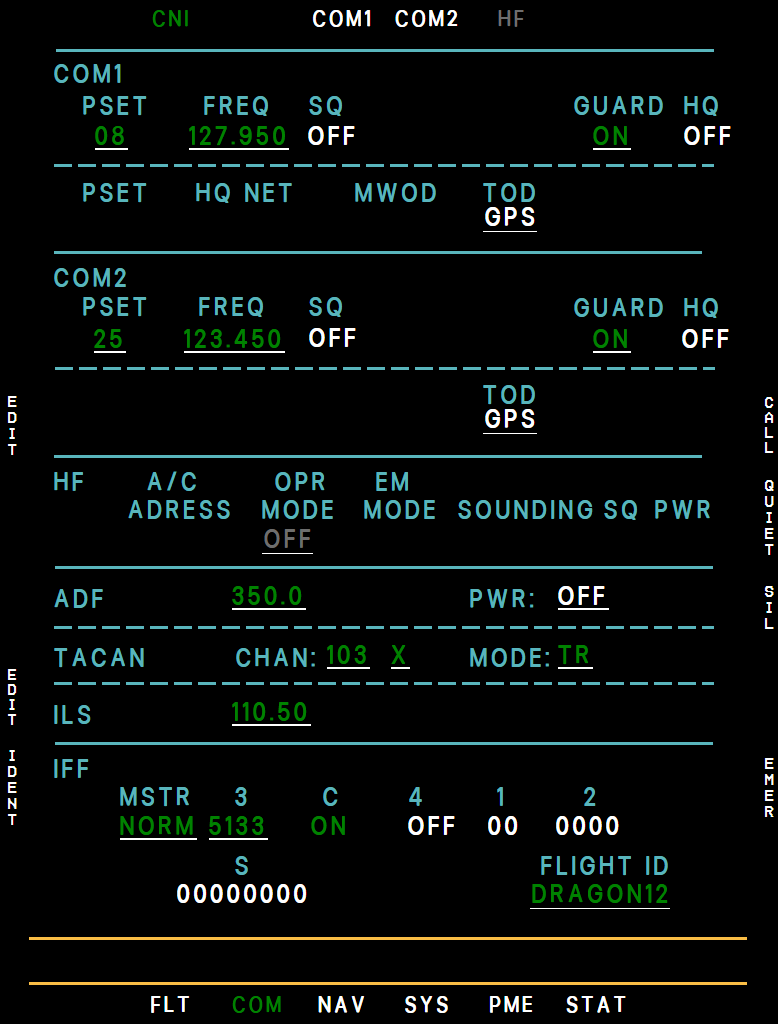
- COM 1 frequency
- COM 2 frequency
- HF (not fitted)
- ADF
- TACAN channel
- ILS frequency
- IFF master
- Mode 3 code
- EDIT (L2)
- EMER (R6)
- L2 EDIT walks through the radio fields - COM 1 and COM 2 (preset, frequency, guard), ADF, TACAN (channel, X/Y, mode) and ILS; L5 EDIT the transponder. Preset 00 tunes that radio to guard, 121.500 (INC/DEC one step below 01, or 0 on the UFCD pad). -- means a frequency that is not one of the presets, such as one entered on the UFCD. COM frequencies are VHF channels from 118.000 to 136.990, the 8.33 kHz ones included; INC/DEC steps one channel and stops at the ends of the band.
- GUARD: switches that radio's separate guard receiver on or off - the same as GRD: on the UFCD COM page. It never retunes the radio; only preset 00 does. ON is green, magenta while the UFCD G key mutes guard for 30 seconds, and white while guard stays muted until G is pressed again.
- ADF: frequency in kHz, 190 to 1749.5 in 0.5 kHz steps as the real ADF-206, set with INC/DEC or the UFCD pad (whole kHz, or with the tenths digit: 3655 is 365.5 kHz, 11470 is 1147.0), and PWR ON / OFF. The ADF does not tune itself - tune an NDB in range.
It starts every flight switched on: with no bearing from the tuned station for 5 seconds you get the ADF SIGNAL advisory, so tune a station or set PWR to OFF. To reach the ADF row: L2 EDIT, then L2 (down) twice for the frequency and L3 for PWR.
- TACAN: channel, X/Y and mode (TR, R, AR, AT). With the TACAN knob on the audio panel at its stop the TACAN is off: MODE reads OFF, channel and X/Y are blank and the cyan TACAN FAULT advisory shows. A yellow TACAN FAULT is a real failure.
- ILS: the frequency the ILS receiver is tuned to. INC/DEC steps through the 40 localizer channels from 108.10 to 111.95 (108.10, 108.15, 108.30, 108.35 ... 111.95) and wraps around; a frequency typed on the UFCD pad must be one of them (1095 = 109.50). In EDIT, L1 (up) from the first row jumps straight to the ILS row. The BCDU ADF and ILS pages have the same settings.
- L6 IDENT: transponder ident.
- R6 EMER then R7 YES: squawks 7700 (the EMER legend turns yellow). Press again to return to your previous code.
- The HF radio is not fitted: its block reads OFF in gray and the HF tab has no page. HAVE QUICK and COMSEC are not modeled. IFF Modes 1, 2, 4 and S are shared with the UFCD page. Only Mode 4 does anything: switched ON without a code it gives IFF MODE 4 RPLY FAIL (see the UFCD IFF page). The FLIGHT ID shown here is fixed.
COM1 / COM2 Presets
25 presets per radio. L1 SEL picks one (L1/L2 up and down, L3 next column) and L5 ENT tunes it. L2 EDIT changes one with INC/DEC (one 8.33 kHz channel a step) or the UFCD pad (a frequency that is not a channel is refused): L5 ENT stores it (and retunes if it is the preset in use), L4 EXIT leaves without storing.
Example MFD com1
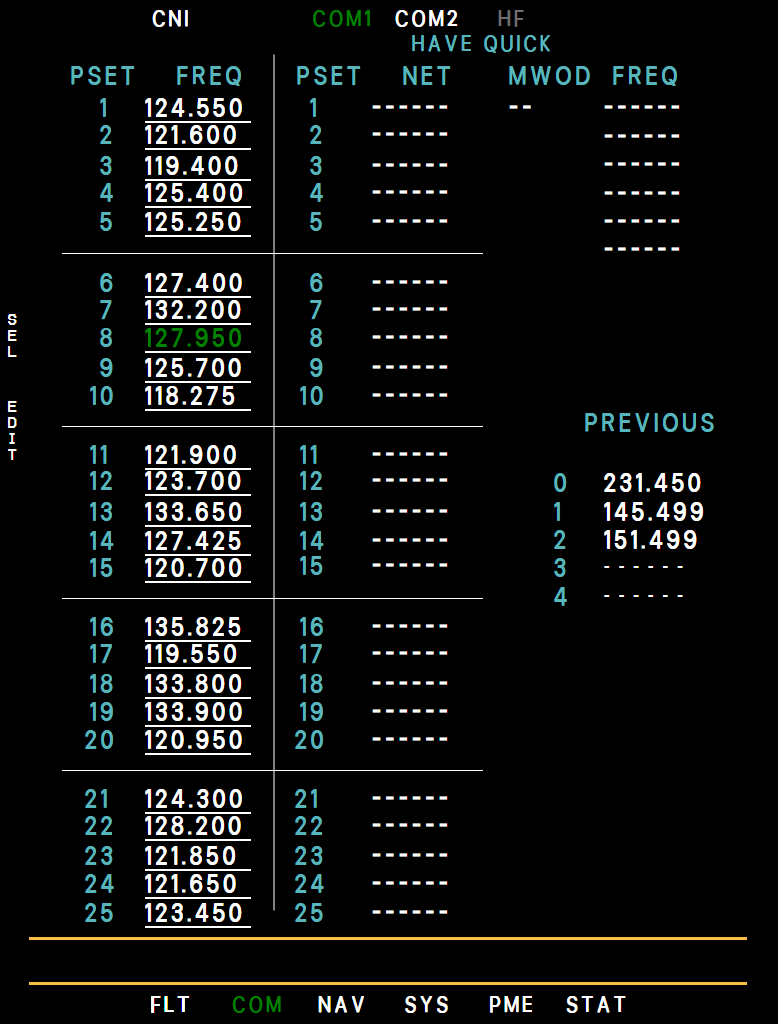
- Preset 1 (KBAB ATIS)
- Preset in use
- HAVE QUICK
- Previous frequencies
- SEL (L1)
- EDIT (L2)
The preset lists are real VHF frequencies: COM 1 holds Beale AFB and US frequencies (preset 1 = KBAB ATIS 124.550, 2 = Beale Ground 121.600, 3 = Beale Tower 119.400 ... 25 = air-to-air 123.450), COM 2 the deployed bases (Fairford, Akrotiri, Osan, Al Dhafra).
To make your own list permanent, edit presets.json in the MFD folder of the package (VHF channels from 118.000 to 136.990, the 8.33 kHz ones included; any other value keeps the built-in preset); changes made in the cockpit last for the current flight only.