 DOCUMENTATION
AFCS System (Autopilot)
Miltech Simulations U-2 features a three-axis Automatic Flight Control System (AFCS), designed to alleviate the load on the pilot during the long high-altitude cruise. The system holds attitude, heading, altitude or Mach number and can follow your navigation source. It never touches the throttle - thrust is always yours.
Sim values. Performance values are measured in the sim. They may not accurately represent (nor do they intend to accurately represent) the performance of the real aircraft.
The AFCS Panel
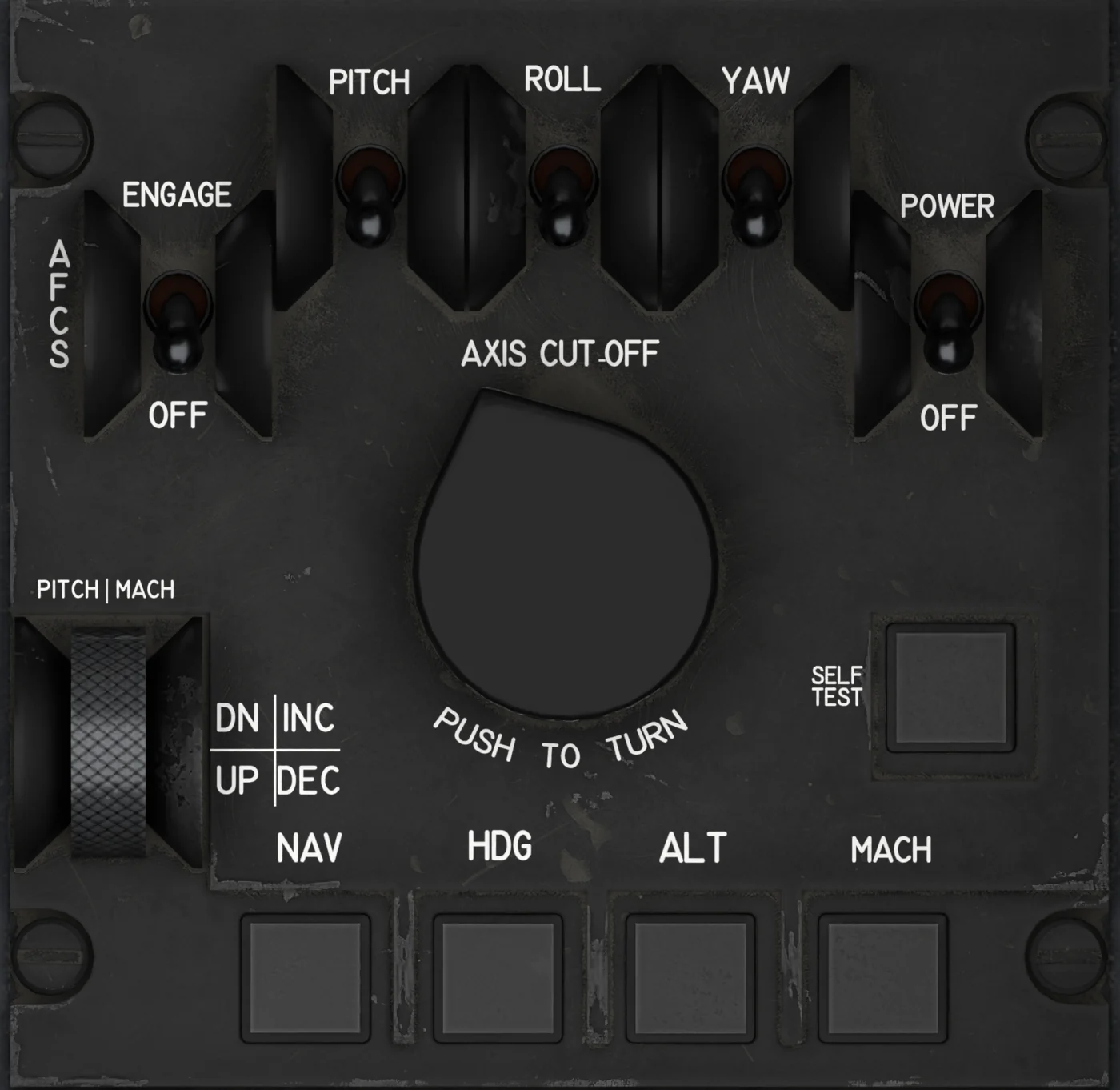
- AFCS PITCH - ON / OFF. Pitch axis cut-off. With AFCS POWER on, any axis OFF lights AUTOPILOT. A trip leaves it ON; cycle it OFF and ON again to reset the axis.
- AFCS ROLL - ON / OFF. Roll axis cut-off; pitch hold stays with it OFF. A trip leaves it ON; cycle it OFF and ON again to reset the axis.
- AFCS YAW - ON / OFF. Yaw axis (yaw damper) cut-off. A trip leaves it ON; cycle it OFF and ON again to reset the axis. All three axis switches are ON on a runway or air start and OFF after a Cold and Dark start.
- AFCS ENGAGE - ENGAGED / OFF. Engages the autopilot, like your autopilot master key; drops back if it cannot (the tooltip says why). Needs INS attitude.
- AFCS POWER - ON / OFF. Powers the autopilot; needs AC power (generator or ground power) and the essential DC bus, so ESS DC SHED drops it too. Switching it OFF disconnects the autopilot. It is OFF after a Cold and Dark start (hangar or apron) and ON on runway, taxi and air starts.
- PUSH TO TURN - Turn for 5° of bank per click, 40° max, cancelling HDG or NAV. Back to centre, the autopilot rolls out and holds that heading.
- PITCH MACH - Adjusts what the pitch axis holds: 0.001 Mach in MACH, 100 ft in ALT, or ¼° of pitch in basic hold, per click.
- AFCS SELF TEST - Lamp test: hold it on the ground with AFCS power on and the ALT, HDG, MACH, NAV and SELF TEST lamps light. The autopilot's built-in test is not simulated.
- AFCS NAV MODE - Tracks the source chosen on the PFD: INS steering (INS in NAV), TACAN / VOR course or ILS localizer. Refused without a valid source.
- AFCS HDG MODE - Follows the heading bug on the PFD. Lit while active; press again to cancel. Not together with NAV.
- AFCS ALT MODE - Holds the altitude at the press; the PITCH MACH wheel changes it 100 ft per click. Lit while active; press again to cancel.
- AFCS MACH MODE - Holds the Mach number at the press, by pitch only; the PITCH MACH wheel changes it 0.001 per click. Not together with ALT.
| Control | Function |
|---|---|
| YAW BAL knob | Rudder trim, 0 to 10 with 5 = neutral, up to 2° either way: 0.2° for each half step of the knob, and the trim follows at 0.5° a second. Works only while the autopilot and yaw axis are engaged; with them off the trim runs back to neutral. |
| ROLL RATE, PITCH RATE, MACH/ALT knobs | Force setting, 0 to 10. 5 is the norm. Above 5 the autopilot is sharper, below 5 softer and slower. ROLL RATE sets how fast it rolls and how hard it steers for a heading or the NAV steering, PITCH RATE how hard it moves the pitch, and MACH/ALT the climb rate in ALT and the pitch range in MACH. Low rate settings (1-3) or high MACH/ALT settings (7-10) can bring a gentle oscillation; in turbulence the real procedure is MACH/ALT towards 3 and PITCH RATE towards 7. |
| AUTOPILOT DISCONNECT (yoke) | Disconnects the autopilot. A keybind or hardware disconnect shows the button pressing too. |
Your normal MSFS Autopilot master key or hardware button does exactly the same as the ENGAGE switch, and the cockpit switch follows it. It also ends a ground engagement.
Engaging
- AFCS POWER on (the aircraft needs AC power - engine generator running, or external power on the ground).
- Check PITCH, ROLL and YAW switches are ON (they are OFF after a Cold and Dark start).
- Fly the aircraft to a stable attitude, then AFCS ENGAGE. The INS must be supplying attitude (aligned, or 30 seconds into an alignment).With no mode selected the autopilot holds the pitch attitude and heading you had at that moment, and switches the yaw damper on.
Modes
| Mode | What it holds | Details |
|---|---|---|
| Basic (no lamp) | Pitch attitude and present heading | Pitch limited to ±20°. HDG and NAV turns are limited to 15° of bank (up to 25° in a NAV turn forced tighter between close DPs, see Navigation System); the PUSH TO TURN knob goes to 40°. |
| ALT | Altitude | Holds the altitude at the moment you press ALT, and aims to stay within 10 ft of it. To change it, turn the PITCH MACH wheel (100 ft per click), use your sim altitude keys, or set the PFD altitude bug and close its field with R1 - the autopilot climbs or descends at up to 900 ft/min (the MACH/ALT knob scales this) and levels without overshoot. Hold your speed with the throttle: the autopilot only pitches, and if the speed falls towards the stall it stops at 87 % of the stall angle and lowers the nose rather than hold the altitude. Don't engage ALT at high altitude while the aircraft is heavy, or with the speed no more than 10 KIAS above the stall - a caution of the real procedure (11.10.2.7). |
| MACH | Mach number, by pitching up or down | Holds the Mach number at the moment you press MACH, and aims to stay within .001 of it; the wheel changes it by 0.001 per click. From 60,000 ft up (fading in from 50,000 ft) it is extra careful: it pitches gently and slowly, within about 1° of trim, and lets small Mach errors ride, opening up again only past about .006 - so a gust cannot pull the nose far, and a .010 change on the wheel takes about 3 minutes up there. Below that it pitches more, up to three times as much by 40,000 ft, because holding the Mach takes it there. From 50,000 ft up (fully from 60,000 ft) it also opens up when the speed itself runs away, as in a descent from the cruise with the throttle back and the drag out: once the Mach is more than .006 off it pitches up to twice as far and trims three times as fast, until the Mach is back within .002. You set the thrust; the autopilot climbs or descends to keep the Mach. Near the stall it will not hold the nose up: it stops at 87 % of the stall angle and lets the Mach run above your selection to keep that margin. ALT and MACH cannot be on together. |
| HDG | The heading selected on the PFD | Follows the heading bug live, set on the PFD or with your sim heading keys. From 40,000 ft up (fully from 50,000 ft), where the bank hold answers slowly in the thin air, HDG and NAV steer on a smoothed bank so they don't rock the wings. HDG and NAV cannot be on together. The heading comes through the AVP: with the MFDs down HDG will not come on, and drops to heading hold. ALT and MACH need valid air data in the same way (no IAS or ALT flag): without it they drop to pitch hold. |
| NAV | Track to the selected navigation source | See "NAV mode" below. |
PITCH MACH Wheel
- In MACH: 0.001 Mach per click.
- In ALT: 100 ft per click.
- In basic pitch hold: ¼° of pitch per click.
- Your sim keys work too. With ALT on, the autopilot altitude keys move the held altitude, 100 ft a press from the altitude held, not from the bug. With MACH on, the autopilot speed and Mach keys move the held Mach, 0.001 a press.
PUSH TO TURN Knob
Each click commands 5° of bank, up to 40° at eight clicks. HDG and NAV keep their own limits, 15° (25° in a forced tight NAV turn). Turning the knob away from center cancels HDG or NAV and the aircraft holds that bank. Return the knob to center and the autopilot rolls out and holds the heading it has as the bank comes back through 15°.
NAV Mode and the Navigation Source
What NAV follows is chosen on the PFD side keys:
| PFD key | Source | NAV mode behavior |
|---|---|---|
| L4 NAV | INS steering computer | Flies the ACTIVE destination point file - legs, turns, direct steers and orbits - along the path the map draws. Requires an aligned INS. If the INS is not in NAV, the mode is refused and the autopilot stays in heading hold; if the INS drops out in flight, the autopilot falls back to heading hold. |
| L5 TAC | TACAN / VOR (NAV 1) | Tracks the selected course. With the TACAN switched off (TACAN knob on the audio panel at its stop) NAV is refused and the roll axis stays in basic heading hold. |
| L6 ILS | ILS localizer (NAV 1) | Tracks the localizer only. There is no glideslope capture - fly the descent yourself. |
| R4 ADF | ADF | Bearing only - NAV mode is not available. |
Pitch Trim
Our rendition moves the stabilizer the way the trim motor does: about 1° every 3 seconds, from 3.5° nose up to 1.5° nose down - roughly 15 seconds from stop to stop. The PFD trim scale runs a little further than that, to 3.8° and -1.8°, so with the stabilizer at a stop its tab does not quite reach the end.
The autopilot pitches through the trim, and while it flies pitch it may run the trim past these stops. In AUTO the stabilizer follows as far as its travel goes; in MANUAL it stays where you left it. After a disconnect the trim runs back to the stabilizer at the same 1° every 3 seconds, so it comes back inside the stops with no step in pitch.
The trim needs three things. With any of them missing the stabilizer stays where it is, autopilot trim included:
- DC power (essential DC bus). ESS DC SHED takes it away.
- MANUAL TRIM POWER ON - the slide switch on the yoke. It is ON at every start; OFF also stops the aileron trim.
- Hydraulic pressure - with the engine stopped the trim does not move.
| Control | What it does |
|---|---|
| Yoke PITCH TRIM switch | Hold left click for nose down, right click for nose up; each mouse-wheel notch gives a short burst. Spring-loaded to off. |
| Your trim keys and trim wheel | Act as the yoke switch, with the same rate and the same rules. A trim wheel axis drives the stabilizer towards the matching position at the motor rate. The yoke switch moves when you use them. |
| PITCH TRIM AUTO / MANUAL (right console) | AUTO with the autopilot engaged in pitch: the autopilot trims, and your switch, keys and wheel are locked out. MANUAL, or AUTO without the pitch axis engaged: only you trim. With the autopilot engaged in pitch its servo then holds the elevator and the PITCH sync indicator shows the out-of-trim force. Whenever the autopilot is engaged without auto trim (MANUAL, pitch axis off, or auto trim failed) the MFD shows AUTOPILOT MAN TRIM. |
Leave the switch in AUTO for autopilot flight.
ROLL and PITCH Sync Indicators
The two bars beside the SFD show the force the autopilot servos are holding. They stay centered with the autopilot off or without AFCS power. With the autopilot engaged they move with the load on the pitch and roll servos - a PITCH bar that stays off center in MANUAL trim means trim until it is centered again. During the ground preflight check they show the commanded control stroke instead.
What You See on the PFD
- AP in a box - autopilot engaged.
- HDG or NAV to its left - active lateral mode (blank in basic heading hold).
- To its right - the held value: Mach as .720M, or the held altitude as a flight level, e.g. FL650 for 65,000 ft.
- Far left - the INS status letter (see the INS chapter).
Automatic Disconnects
In flight, the AFCS watches each axis and cuts it out if the aircraft is being thrown around more than the autopilot should allow:
| Axis | Trips when... | MFD message |
|---|---|---|
| Pitch | Pitch is more than 15° away from the target, or pitching faster than 4.4°/s | PITCH DISC |
| Roll | Bank exceeds 45°, or a fast roll beyond 25° bank | ROLL DISC |
| Yaw | Yawing faster than 8°/s | YAW DISC |
| All three | Moderate turbulence above 60,000 ft, lasting 8 seconds | PITCH DISC, ROLL DISC, YAW DISC |
The rate limits leave out the rate a steady turn gives by itself, so a 40° knob turn does not trip them. If all axes are lost the autopilot disconnects. A trip leaves that axis switch ON: cycle it OFF and ON again to reset the axis. After a disconnect the DISC advisory of every disengaged axis stays on the MFD until the autopilot is engaged again.