 DOCUMENTATION
Speedbrakes and Lift Spoilers
The U-2 has two separate drag devices, and our rendition models them separately. Your normal spoiler key moves only one of them - read this page before your first landing.
Speedbrakes
The panels on the sides of the fuselage. Moved by your normal MSFS spoiler key or axis. Used to slow down and descend. Out, they raise the nose a little, most of it near full travel.
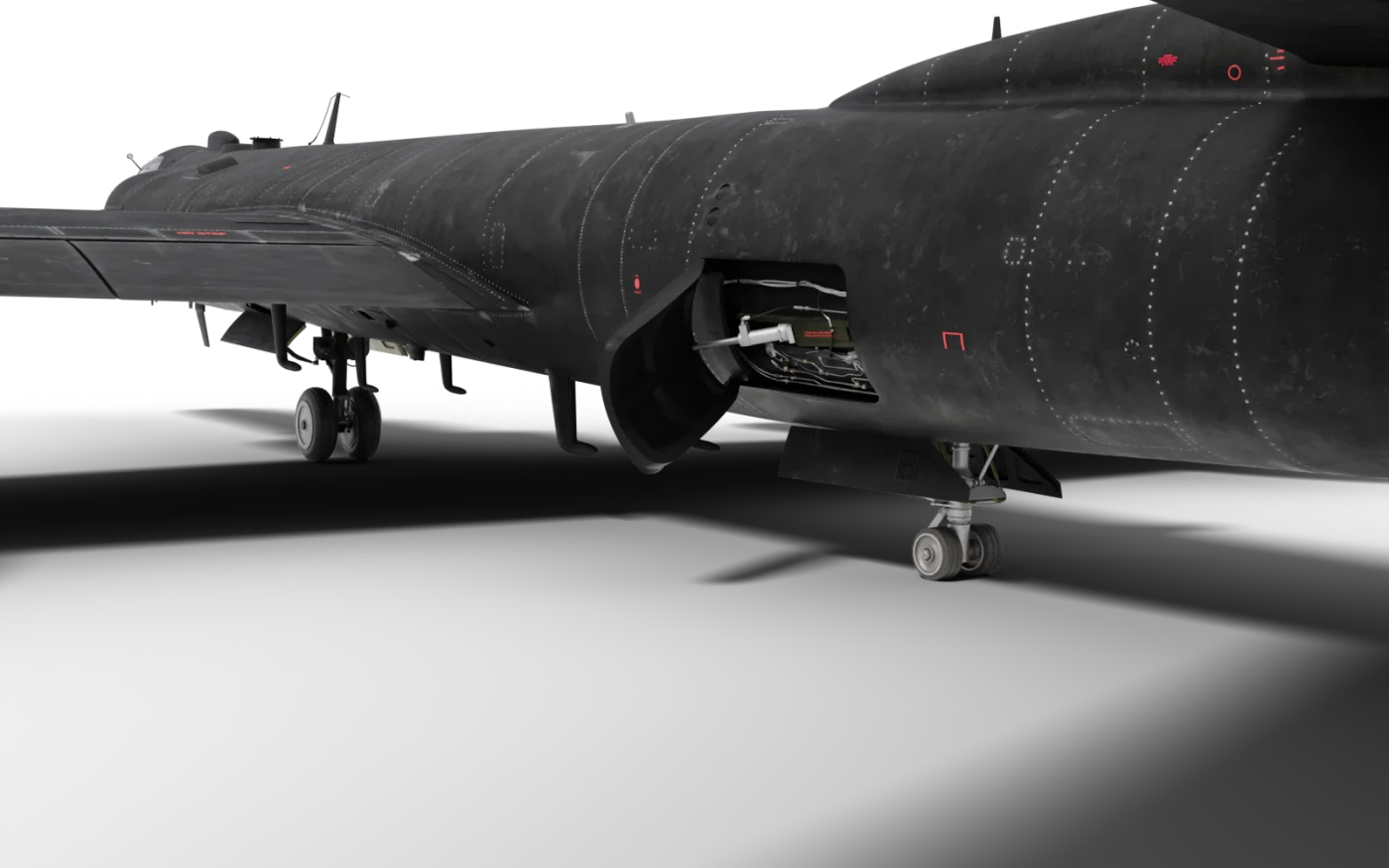
- Speed brake (open)
- Speed brake actuator
- Tail gear
- Main gear
Lift Spoilers
The panels on top of the wings. Moved by the cockpit SPOILER switches and the yoke SPOILER button. They kill lift - used on descent and to make the aircraft stay on the runway after touchdown.
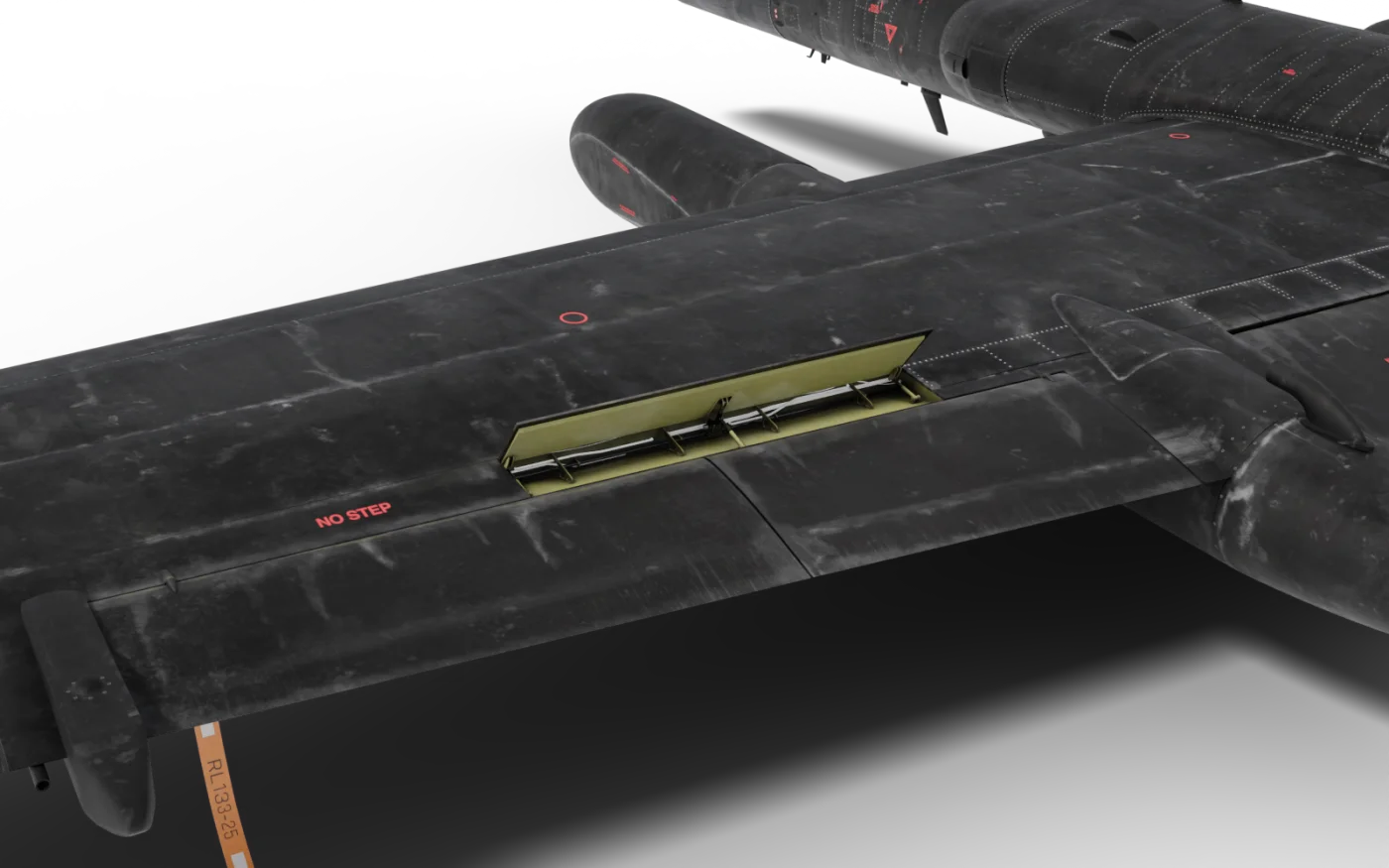
- Lift spoiler (up)
- Roll spoiler (stowed)
- Flap (up)
- Superpod
- Pogo
Each device gives half of the total available drag; with both out you have all of it. Speedbrakes take about 5 seconds for full travel either way; lift spoilers take about 0.2 seconds, up or down. The roll spoilers on the outer wings work by themselves with the ailerons: turn the yoke past 38° (about a third of its 120° travel) and the one on the low wing pops all the way up as the aileron gets there, like a switch, in about a quarter of a second, for more roll rate and some drag on that wing; it goes down again with the aileron, in 0.2 seconds.
With GUST CONTROL UP the yoke stops at 77° and the roll spoiler comes at the same 38°. With the speedbrakes or lift spoilers out, a roll spoiler that pops also takes their drag off the other wing while it is up, because the simulator runs them all on one spoiler surface (the panels you see do not show it).
Raising the lift spoilers lifts the nose a little (light to moderate), as full speedbrakes do. Up high, turning close to the buffet, the stowed roll and lift spoiler panels float up a little and add to the shake.
Cockpit Controls
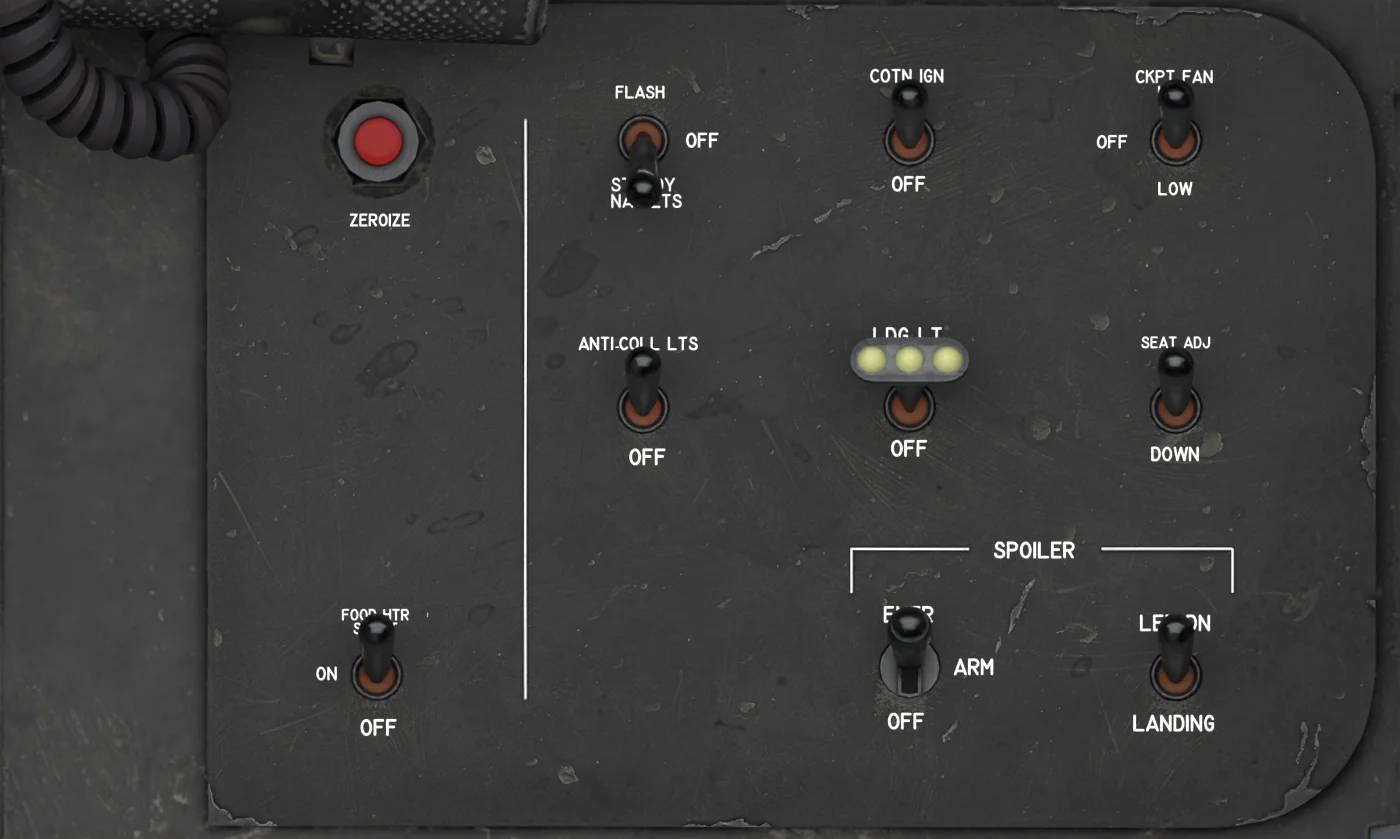
- ZEROIZE - Hold 3 s with the AVP up: erases the DP files, fixes, COM presets, IFF codes and squawk, and resets the INS.
- CONTINUOUS IGNITION - ON / OFF. Keeps the engine igniters on continuously; OFF leaves ignition automatic. ON for takeoff, OFF after landing.
- COCKPIT FAN - HIGH / OFF / LOW (up / center / down). Mixes the cockpit air: faster temperature changes, and it helps clear canopy fog.
- SEAT ADJ - UP / OFF / DOWN. Hold left click to raise, right click to lower your eye point; springs back to OFF. Needs monitored DC.
- FOOD HEATER - OFF / ON / START. START, which springs back to ON, heats a Dragon Food tube; FOOD READY shows when it is hot. OFF resets it.
- SPOILER - OFF / ARM / EMER. Lift spoiler power: ARM main hydraulics (normal flight), EMER the accumulator (takeoff, hydraulic failure). OFF retracts them.
- LANDING SPOILERS - LANDING / LET DN. LET DN raises the lift spoilers and keeps them up; LANDING raises them only while the SPOILER button is pressed.
The NAV LIGHTS, ANTI-COLLISION LIGHTS and LANDING LIGHT switches on this panel are on the Lights page.
SPOILER Switch - OFF / ARM / EMER
| Position | What it does |
|---|---|
| OFF | Lift spoilers retract and cannot be deployed. |
| ARM | Normal position for flight. Lift spoilers are powered by the main hydraulic system. They need hydraulic pressure: nothing below 500 psi, full travel from 1500 psi. |
| EMER | For take-off (see Checklists) and after a hydraulic failure. Lift spoilers run from a stored-pressure accumulator, which is good for roughly 3 deployments; the ISS pump refills one deployment in about 4 seconds. A partly used accumulator gives only partial deployment. |
The lift spoilers also need DC electrical power. If power is lost they retract.
When you move the switch from OFF to ARM (or EMER) with pressure available, the lift spoilers twitch up briefly and settle again.
Landing Spoilers Switch - LANDING / LET DN
| Position | What it does |
|---|---|
| LANDING | Lift spoilers come up only while the SPOILER button is pressed (see below). |
| LET DN | "Let-down" = descent. Lift spoilers deploy and stay up until you return the switch to LANDING. |
SPEED BRAKE Switch (Throttle)
Three positions, IN / OFF / OUT, spring-loaded to OFF. Hold left click for OUT, right click for IN: the speedbrakes move while you hold it and stop where they are when you let go. Each mouse-wheel notch gives a quarter of a second of travel, up to the full 5 seconds queued.
Your spoiler key and axis keep working as well, and the switch shows OUT or IN while they drive the brakes.
SPOILER Buttons (Yoke and Throttle)
Hold a SPOILER button and the lift spoilers stay up while you hold it. A quick click (shorter than about a third of a second) latches them up; click again and they retract. Selecting LET DN or OFF clears the latch. It only works with the SPOILER switch in ARM or EMER and the other switch in LANDING.
Setting Up Your Controls
| MSFS control | What it does in the U-2 |
|---|---|
| Spoilers toggle / extend / retract / spoiler axis | Speedbrakes only. The axis is proportional. |
| Toggle water rudder recommended | The yoke SPOILER button (lift spoilers). One press = one click. |
| Arm auto-spoilers (toggle) | Same as above - one click of the SPOILER button. |
| Arm auto-spoilers ON / OFF | SPOILER button press / release - useful for a true "hold" button. |
- In MSFS open Settings → Controls and pick your joystick or keyboard.
- Search for water rudder and assign a button to Toggle water rudder.The U-2 has no water rudder, so the add-on borrows this control.
- Press once to deploy the lift spoilers, press again to retract. If you would rather hold the button, set the binding to fire on both press and release.
How to Use Them
Descent
- SPOILER switch ARM.
- Landing spoilers switch to LET DN - the lift spoilers rise and stay up.
- Add speedbrakes with your normal spoiler key if you need more drag.
- Before the approach, return the switch to LANDING and retract the speedbrakes as needed.
Landing
- SPOILER switch ARM, other switch LANDING.
- At touchdown press your SPOILER button binding. The wing stops flying and the aircraft stays down.There is no automatic deployment on touchdown - it is always your press.
- Press again to retract once you have slowed.
Things to Know
- Blow-down: above 105 knots the airflow pushes the lift spoilers partly down. At 150 knots you get about half deflection, at 210 knots about a quarter. One wing's panels, picked per flight, give a little more than the other's: with the lift spoilers up above about 100 KIAS the aircraft drifts slowly in roll toward the other wing, and the drift stops when they come in. Check for it before you trim a roll out.
- Stall: lift spoilers up raise the stall speed about 2 kt, and the AOA tones and the stall tape move with it. The speedbrakes do not move the stall.
- SPOILER NOT DOWN appears if the lift spoilers stay up more than 5 seconds after you commanded them down.
- The speedbrakes need hydraulic pressure and DC power too: below 500 psi they do not move (full speed from 1,500 psi), and without pressure or power the airflow slowly pushes open speedbrakes closed in flight.
Gust Control
The GUST CONTROL switch (FAIRED / UP) is the U-2's way of unloading the wing in turbulence. In UP the switch moves both surfaces by itself in 3 - 4 seconds: the flaps go 6.25° up on hydraulic pressure (the PFD flap symbol shows them 6° up and the number under it reads -7) and the ailerons 7.5° up on electric power.
The nose pitches up a little as they go, and down again when you go back to FAIRED - trim it out: in UP the stabilizer keeps her trimmed all the way to the 241 KIAS red line. From about 150 KIAS the change is hardly noticeable.
While it is UP the flap lever stays at OFF and does nothing, and a flap key or axis is taken straight back to the gust position. The cockpit yoke stops at ±77° instead of ±120° at low speed, so the ailerons have less travel there.
From about 125 KIAS your strength runs out before the wheel gets to the stop, so the roll is the same as faired: about 15°/s at 160 KIAS and 10°/s at 210. The roll spoilers still pop at 38° of wheel. Without hydraulic pressure the flaps stay where they are.
A surface that has not got there 7 seconds after the switch moved lights CONFIG with FLAP GUST MISMATCH (the flaps, either way) or AIL GUST MISMATCH. The speed limit also changes - 241 KIAS with gust control UP against 181 faired below 43,000 ft, but only with both surfaces up; from 43,000 to 49,499 ft it is 181 KIAS either way (see the red band on the SFD and PFD). Fly with it UP in rough air at low level, FAIRED for take-off and landing with flaps.