 DOCUMENTATION
Variants
The U-2 comes in three variants, all in one purchase. This manual covers the U-2S. Each variant also has its fit: the sensors and equipment you choose in the U-2 EFB.
Two Releases, One Purchase
Release 113 November 2026The U-2S, 19 liveries, the ASARS-2 radar, the SYERS-2A camera and the optical bar camera, four sceneries with the chase car and the runway and pogo crews, the Datalink Portal, and 7 missions in the U-2 Spyplane Mission Pack.
Release 2 · Free updateA few weeks laterThe U-2R with the round-dial cockpit and the J75 engine, NASA's ER-2, period chase cars, and 5 to 10 more missions planned.
The Three Variants
Available 13 Nov 2026U-2SDigital cockpitThe aircraft the U.S. Air Force flies today, re-engined with the GE F118 from 1994. Three MFDs, the UFCD, the BCDU, the INS and the SFD. This manual covers the U-2S.In the sim: U-2S - Digital CockpitEngineGE F118Liveries19Ground vehiclesChase car: USAFPogo pickup: ModernCrew van: USAF
Free updateU-2RAnalog cockpitThe larger airframe of 1967, about a third bigger than the first U-2s, with the classic round-dial cockpit and the drift sight.In the sim: U-2R - Analog CockpitEngineP&W J75Liveries15Ground vehiclesChase car: 1970sPogo pickup: OldCrew van: USAF
Free updateER-2NASA analog cockpitNASA's high-altitude research aircraft, delivered from 1981, with the analog cockpit.In the sim: ER-2 - NASA Analog CockpitOperatorNASALiveries3Ground vehiclesChase car: NASAPogo pickup: ModernCrew van: NASA
Choose the variant in the aircraft selection: Miltech Simulations U-2, then the variation shown on each card. All three share the fuel, electrical, hydraulic, oxygen, autopilot and lift spoiler systems, the chase car with its ground crew, and the U-2 EFB.
U-2S Fit
The fit is the equipment you carry. You change it on the EFB Aircraft tab, on the ground or in flight, and the weights go to the aircraft's payload. The picture shows where each item goes, drawn with all of it fitted at once; the numbers match the table.
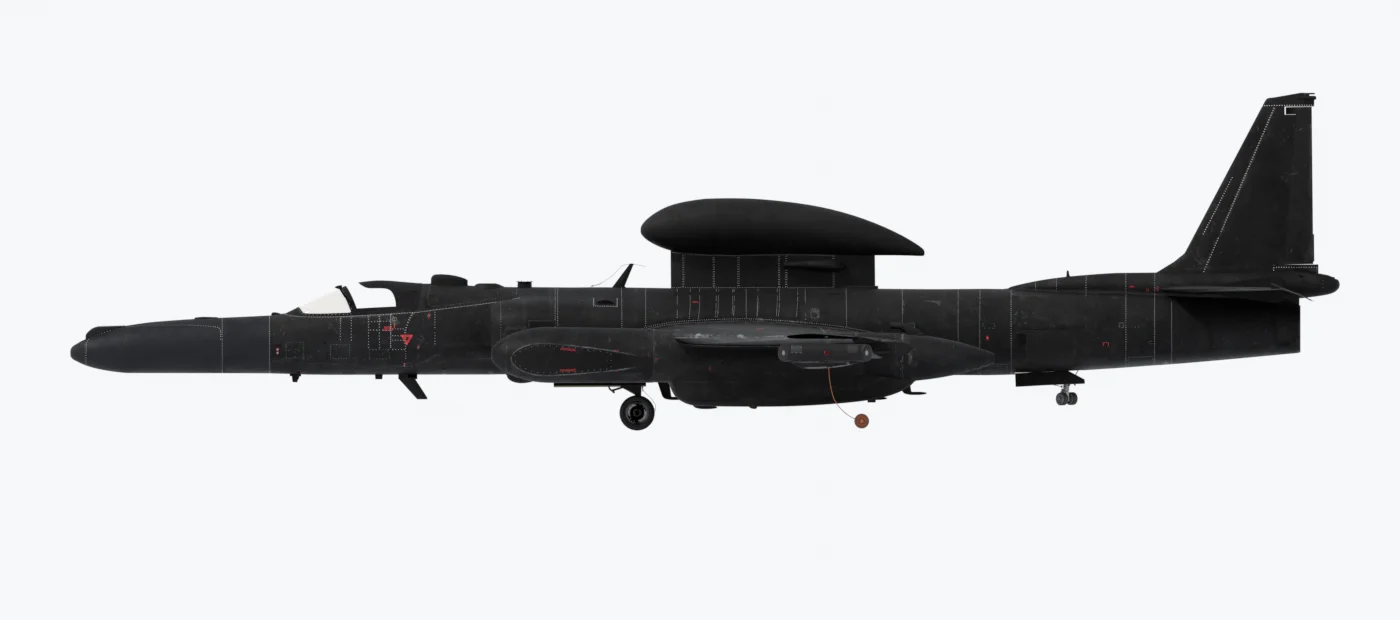
| # | Item and what it is | Where it goes | Choices | Weight |
|---|---|---|---|---|
| 1 | Nose The interchangeable nose cone. It decides the working sensor: the radar (MFD RDR page), the camera (MFD CAM page), or none. |
Front of the fuselage | ASARS-2 radar Default · Standard (no sensor) · SYERS-2A camera | 1,000 · 300 · 650 lb |
| 2 | Q-bay The equipment bay behind the cockpit. It can carry the optical bar camera (OBC), a panoramic film camera. |
Behind the cockpit, with a window underneath | Empty Default · OBC camera The OBC needs the Standard nose. |
0 · 1,050 lb |
| 3 | Superpods Long pods that carry signals-intelligence equipment. In the simulator they change the look, weight and balance only. |
On each wing, outboard of the fuselage | Type A (Senior Ruby) Default · Type B (Standard) · None With None, covers fill the gap in the wing. |
2 × 800 · 2 × 600 · 0 lb |
| 4 | Senior Spear An attachment on the Senior Ruby pod. The left wing then sits heavy: about 40 gal moved from the left to the right inboard tank balances it. |
On the left Type A pod only | Fitted · Removed | +400 lb, left pod |
| 5 | SPAN A large fairing with a satellite antenna, to send data to the ground from beyond line of sight. |
On the spine, above the wing | Off Default · On | 1,100 lb |
| 6 | Dorsal sensors 1 - 3 Three small sensor fairings. The numbers match the markers on the EFB drawing. |
On the spine, behind the canopy | Each fitted Default or removed | 300 lb each |
| 7 | Belly sensor (4) One sensor fairing. |
Under the fuselage, near the Q-bay window | Fitted Default · Removed | 300 lb |
| Belly blade antennas The ventral blade and hooked antennas. |
Under the fuselage | Fitted · Removed | - | |
| Stabilizer vortex generators Small vanes of the 1968 airframes. |
On the horizontal stabilizer | Removed · Fitted | - |
The Default tags show the fit of a new installation. Only the nose and the Q-bay decide which sensor works: the ASARS-2 radar, the SYERS-2A camera and the OBC are the working sensors, and you carry one at a time. The other items change the look, the weight and the balance only. All sensor weights are estimates. More on each item is under Sensors and Electronic Flight Bag (EFB), Aircraft tab.
U-2S Liveries
The U-2S comes with 19 liveries. The tail number is also your ATC callsign. To make your own liveries, see Paint Kit.
USAF Default80-1066USAF 68-1032968-10329USAF 68-1033168-103319RW 68-1033168-10331USAF 68-1033768-10337USAF 80-106680-1066USAF 80-106780-1067USAF 80-106980-1069UN 80-106980-1069USAF 80-107080-1070USAF 80-1070 WR80-1070USAF 80-107680-1076USAF 80-107780-1077USAF 80-107880-1078USAF 80-108580-1085USAF 80-108780-1087USAF 80-109280-1092USAF 80-109480-1094USAF 80-109680-1096