 DOCUMENTATION
System Pages (SYS)
The SYS pages hold the fuel and performance data (PERF), the consumables (CNSUM) and the calibration page (CAL).
PERF
Example SYS PERF page
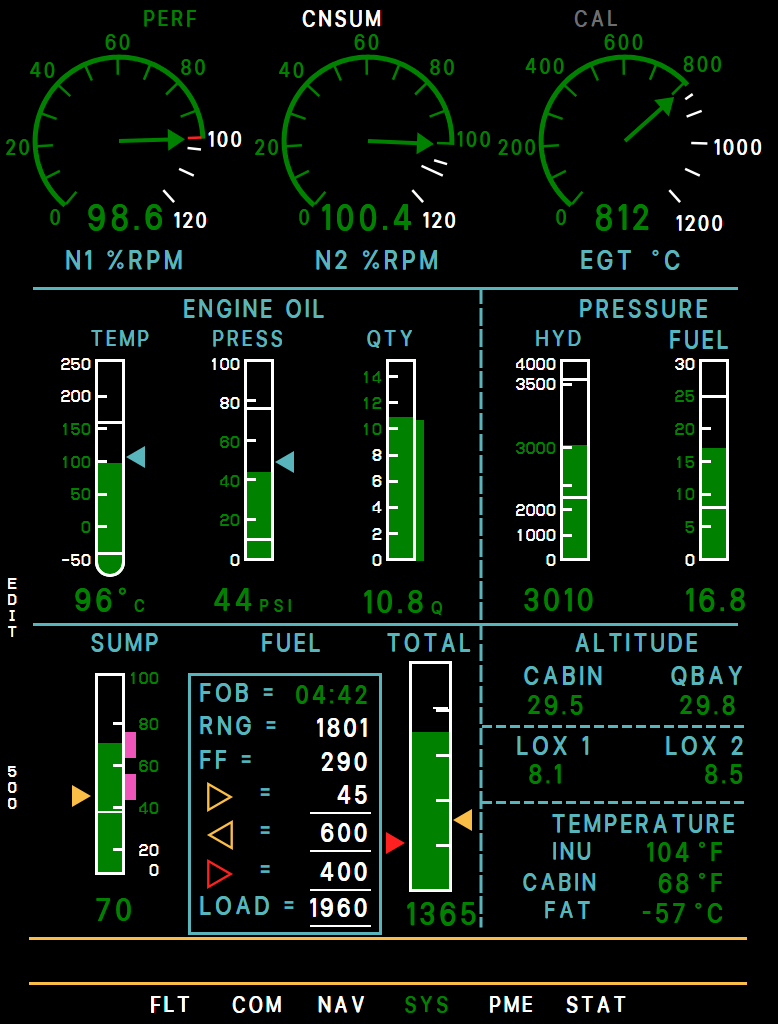
- N1 (% RPM): Red above 100 %.
- N2 (% RPM): Red above 106.3 %.
- EGT (°C): Red above 842 °C. Climb power above 45,000 ft is 650 - 725 °C - see Power and EGT.
- Engine Oil: Temperature, pressure and quantity. The cyan pointers mark the highest value of this flight. The quantity tape is a 15-minute average, the thin strip inside shows the actual value. The reading swings as the oil moves in the climb and descent; the real quantity does not change.
- Hydraulic Pressure (psi): Red with HYD PRESS LOW or HYD PRESS HIGH: 5 seconds below 2,850 on the ground with the engine running (2,800 in the air), or above 3,250.
- Fuel Pressure (psi): 15-19 with both boost pumps, 11-15 on one. Yellow below 8 or above 25.
- Sump Tank Quantity (Gallons): About 70 (50 when feeding from the outboards) - the magenta bands. Red at 38 or less.
- Fuel Data: FOB = endurance (h:mm) of the TOTAL count at the present fuel flow, RNG = range (NM), FF = fuel flow (gal/h). Below are your three fuel bugs (sump, yellow total, red total) and LOAD.
- Total Fuel (Gallons): The fuel totalizer, the same count as the window of the GPH gauge. It starts at the fuel in the tanks, counts down with the fuel flow and is set again with LOAD or 500, so fuel lost any other way (a leak, a dump) does not show in it. On a long cold flight it reads a little high as the fuel shrinks. Turns yellow / red below your bugs.
- Cabin and Q-Bay Altitude (x1000 ft)
- Liquid Oxygen Quantity (Liters), systems 1 and 2. A converter's reading turns red below 1 liter.
- Temperatures: INS unit, cabin (°F) and outside air (°C). The outside air temperature comes from the probe through the air data unit: dashes without it, or while the probe reads out of range - its heater (PITOT HEAT) takes it there in about a minute standing still, with APCU FAULT.
- EDIT (L4): Each press selects the next item: sump bug, yellow bug, red bug, LOAD; the EDIT legend stays up while you step. Change with INC/DEC (sump 1 gal, bugs 5 gal, LOAD 10 gal) or the UFCD pad. While editing the sump bug, L5/L6 set 35 or 65. A new LOAD only counts after L5 YES; L6 NO drops it. L3 EXIT.
- 500 (L6): Asks 500?, written down the left side between L5 YES and L6 NO, and hides EDIT until you answer. YES sets LOAD and the TOTAL count to 500 gallons, NO cancels; other keys do nothing meanwhile.
LOAD sets the totalizer, not the fuel in the tanks. A LOAD you enter (or 500) becomes the TOTAL count, and the TOTAL tape is scaled to it. LOAD takes a fuel load on the ground (and the fuel at an air start); in flight it stays put unless you set it, so LOAD minus TOTAL is the fuel you have used. To put fuel in the aircraft, use the MSFS Fuel and Payload window.
The fuel bugs start switched off on every flight, and the aircraft has no built-in "low total fuel" warning - so set them. Falling below a bug gives you CHECK SUMP QTY or CHECK TOTAL FUEL.
CNSUM - Consumables
Plots fuel, oxygen and oil over a 15-hour timeline against a planned burn curve. R1 selects the planned load, R2-R4 the aircraft configuration (CLN / POD / PEG), R5 RESET restarts the trace. The plan curve is a generic estimate.
Example MFD cnsum
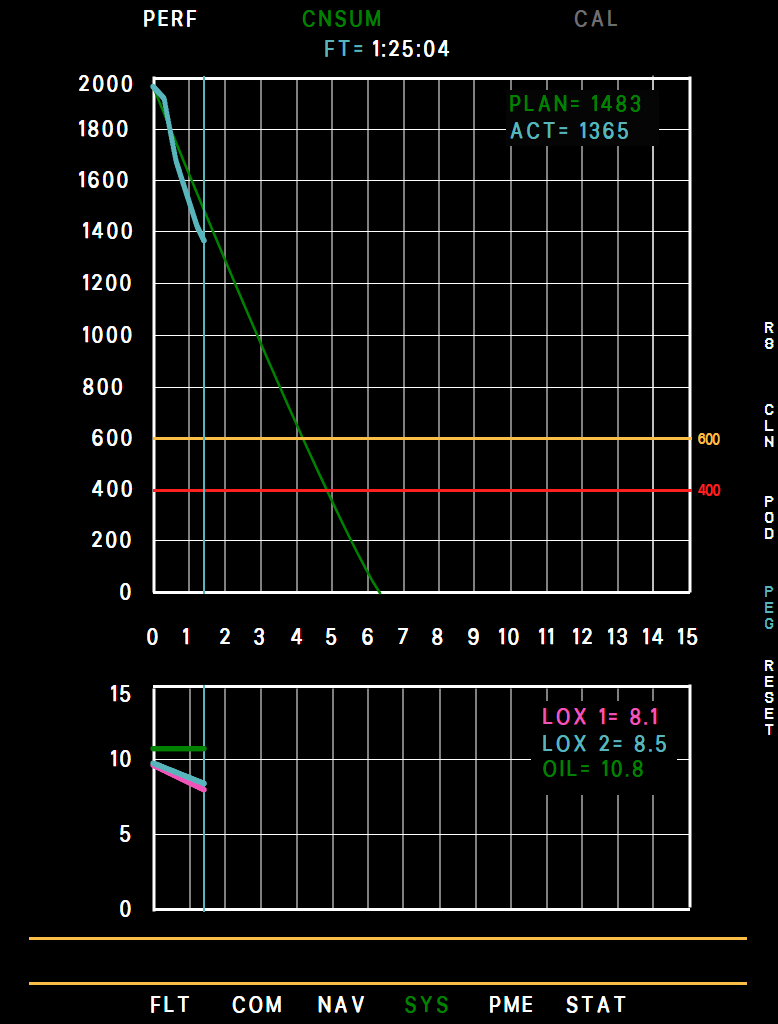
- Time since start
- Planned fuel
- Actual fuel
- Yellow bug
- Now
- LOX / oil
- Planned load (R1)
- Configuration
- RESET (R5)
CAL - Calibration
A maintenance page for the sump and liquid-oxygen quantity indications, reached with T6 CAL from PERF or CNSUM. It can only be selected on the ground: in the air the CAL tab is gray (a CAL page already open at takeoff stays until you leave it). The bottom of the page shows ON GROUND or AIRBORNE.
Example MFD cal
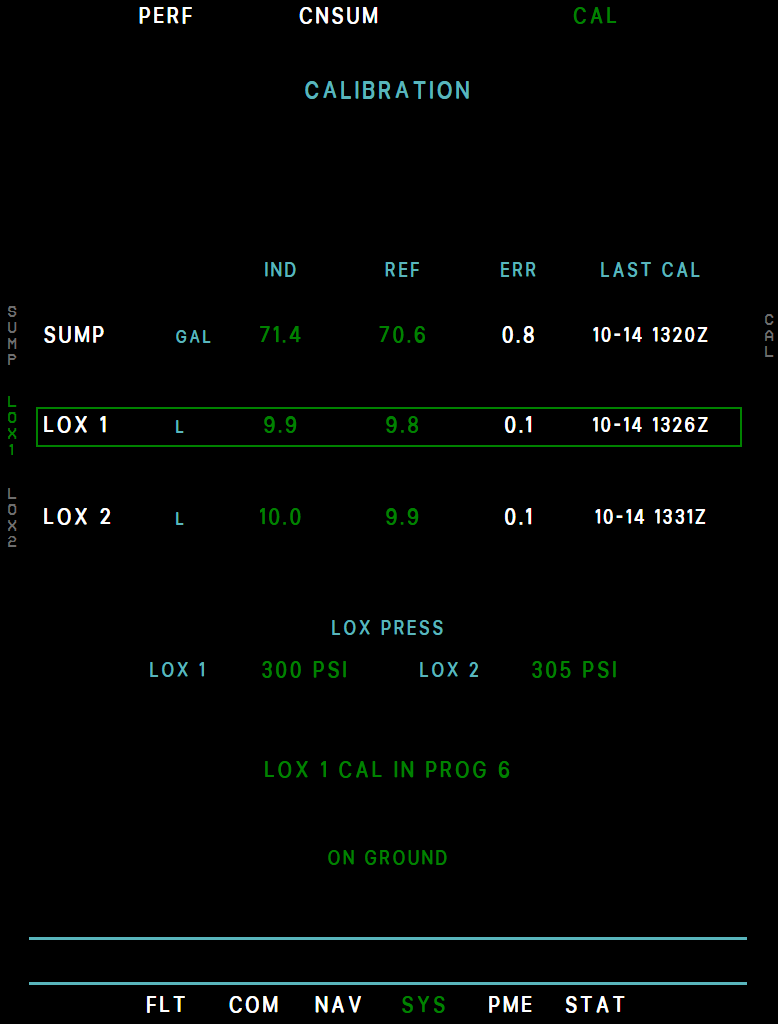
- Indicated
- Reference
- Difference
- Last calibration
- Selected row
- LOX pressures
- Calibration running
- ON GROUND
- One row each for L1 SUMP (gallons), L2 LOX 1 and L3 LOX 2 (liters): the indicated quantity (IND), the system's own quantity (REF), their difference (ERR, yellow when it is more than 3 gal or 0.2 l) and the date and time of the last calibration. The two LOX converter pressures are shown below.
- Select a row with its left key (green box), press R1 CAL and confirm with R6 YES - any other key cancels. The calibration takes 8 seconds (CAL IN PROG); the keys do nothing meanwhile, and leaving the page cancels it. CAL COMPLETE then shows with the new LAST CAL time, on all three MFDs.
In our rendition a calibration records its date and time; it does not change the indicated quantities.